|
Survey - Deployment
|   |
The deployment tab provides options related to the deployment of the survey to respondents.
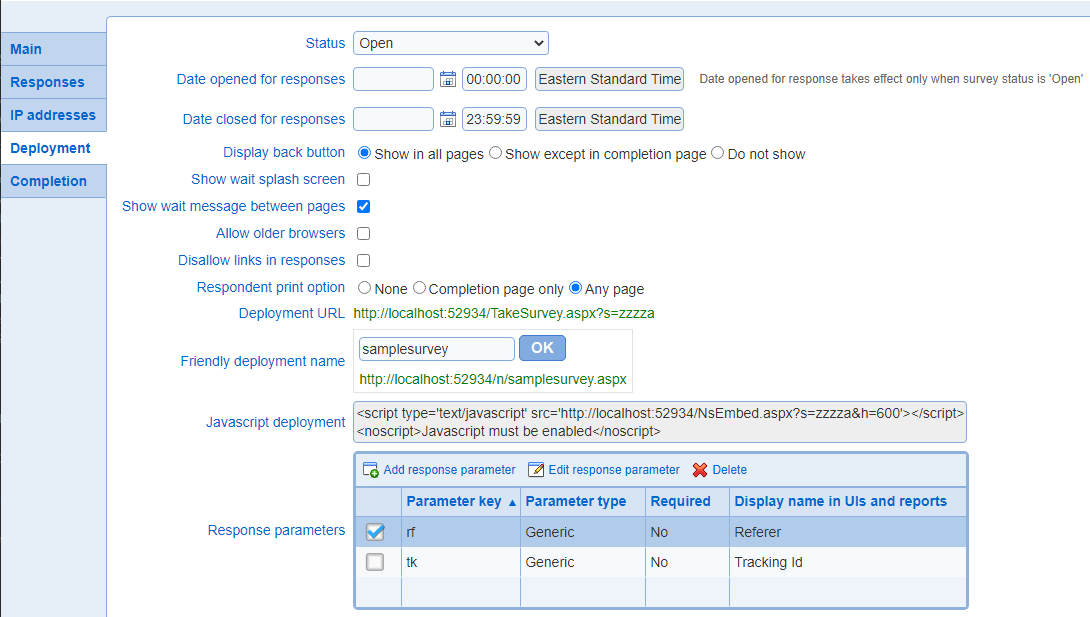
The status of the survey: one of Design, Open, Closed
Design: the survey is currently being defined. Respondents cannot take the survey. User with design privileges to the survey can make modifications to the content of the survey.
Open: the survey is defined fully and is ready to take. Respondents can take the survey if the conditions defined in the Responses tab apply. Note that in addition of the survey status, the open and close dates for the survey (see below) affects whether responses can be entered.
Users that have design privileges to the survey can still make changes to the content of the survey. These changes will take effect as soon as the survey is saved.
Close: the content (i.e., questions) of the survey cannot be modified. No new responses are allowed.
The open and close date define a time interval during which respondents can answer the survey. Note that resumption of an answer and the sending of email invitations are subject to the open and close date.
If the open date is not defined, responses are accepted as soon as the survey is opened. The open date takes effect only is the survey is opened.
If the close data is not defined, responses are accepted as long as the survey is opened.
The time component for the open and close date should be specified in a 24 hour format (12:00 AM = 00:00, 12:00 PM = 12:00, 1 PM = 13:00, 11:59 PM = 23:59). When a date is not defined, the time component does not apply.
The open and close date including the time component expressed based on the preferred time zone for the current user profile. Note that changing the time zone in the user profile will result in the open and close being automatically adjusted to the new time zone.
Example: if the time component for the open date is 13:52 and the preferred time zone is EST, and the time zone is changed to CST, then the time for the open date will be shown as 12:52. The change is due to the fact that 12:52 CST = 13:52 EST).
- Display back button
The back button allows respondents to navigate to preceding pages in the survey. If the back button is not shown in a page for the survey, the respondent cannot go back to the prior page.
If the survey includes sections, the back button is never shown in the first page of a section.
The options available to either display or not display the back button in the survey are:
Show in all pages: the back button is available in all pages for the survey, including the completion page
Show except in completion page: the back button is available in all pages for the survey but not in the completion page
Do not show: the back button is not available in any page
- Show wait splash screen
If set, a wait message will be shown when a participant accesses the survey. The message for the splash screen can be customized in the messages screen for the survey. A wait splash screen is useful for survey with many pages and question or surveys that have a large number of question in the first page. It can be useful when participants access the system through slow network connection.
- Show wait message between pages
If set, a wait message will be shown when a participant navigates between pages in the survey. The message for the splash screen can be customized in the messages screen for the survey.
- Allow older browsers
If set, access to the survey from old browsers will not be allowed. Old browsers include IE version 7 or less, Firefox version 3 or less, Safari version 5 or less and Chrome version 17 or less. These older browsers do not support all of the features available in surveys, and in particular question show & hide. The recommended setting for this option is to have it turned off for all surveys.
- Disallow links in response
If set, respondents are prevented to enter links in text field in surveys. The restriction applies to all text fields and text areas for any type of question.
- Secure access (https)
Controls whether the survey can be access using regular or secure web access. Under secure (https) access, all data transmitted between the participant's browser and the web server for the system is encrypted.
This option is available only when the system is setup to function in secure mode.
- Respondent print option
Controls the printing and PDF generation function available to respondent as they take a survey. Note that the PDF generation function available to respondents is different from the one available in preview mode. In preview mode, the PDF contains all the page for the survey while it generate only the current page when used by respondents.
The printing and PDF tools  are available at the top right of the survey window.
None: Printing and PDF generation is not available.
Completion page only: Printing and PDF generation are available in the completion page only. Since the completion page includes the capability to show respondents their complete answer to the survey, this option allows for printing the completed survey.
Any page: Printing and PDF generation are available for all of the pages in the survey.
The system generated URL to take the survey. The URL can be used to create a link to the survey from a web page or an email.
If you are using Internet Explorer, you can copy the URL to the clipboard by clicking icon 
Note that the server name in the URL is configurable in the system configuration page and the application path portion of the URL is configurable at the level of the IIS web server.
The friendly deployment name for the survey allows to define a custom URL for answering the survey. Enter the custom name in the text box and press OK. The URL will reflect the new custom name.
Important: the friendly name should not be changed after the link to the survey has been posted or emailed.
- Domain name deployment
This option allows to deploy a survey using a subdomain in the URL. Enter the desired subdomain in the text box and press OK. The URL will reflect the new subdomain name.
Note that if the text box is disabled, your level of subscription does not include this feature.
If the domain name deployment is not visible in the screen, then the DNS settings do not allow deployment of surveys using a domain name. To allow for domain name deployment, the DNS settings should allow for wild card resolution to the server running the web application. DNS settings are managed outside of Novi Survey by your network administrator.
Important: the subdomain should not be changed after the link to the survey has been posted or emailed.
- Javascript deployment
This option allows to embed a survey in a web page. Copy the script statements shown in Novi Survey and include them in the web page, at the location where you want the survey to be displayed.
The embedding of the survey can be controlled through parameters in the URL for the 'src' attribute of the script statement. These parameters are as follows:
width: if the URL contains a parameter name w and the value for the parameter is a positive integer, the width for the survey will be set to the value for the parameter. Otherwise, if the template for the survey has a fixed width the width for the survey will be the width for the template plus 20 pixels. Otherwise, the width of the survey will be 650 pixels.
Example:
<script type='text/javascript' src='https://novisurvey.net/NsEmbed.aspx?s=zzzza&w=350'></script>
height: if the URL contains a parameter name h and the value for the parameter is a positive integer, the height for the survey will be set to the value for the parameter. Otherwise, the height of the survey will be 650 pixels.
Example:
<script type='text/javascript' src='https://novisurvey.net/NsEmbed.aspx?s=zzzza&h=500'></script>
language: To specify a language for the survey, add parameter 'c' to the URL with value the code of the language for which the survey should be displayed. The code for the languages are available in the main tab of the survey setup.
Example (survey is defined for more than 1 language, including French (France))
<script type='text/javascript' src='https://novisurvey.net/NsEmbed.aspx?s=zzzza&c=fr-FR'></script>
other response parameters: to specify values of response parameters (see below) for the survey, add the parameters and the value for the parameter to the URL.
Example (assumes that a response parameter 'tk' is defined for the survey):
<script type='text/javascript' src='https://novisurvey.net/NsEmbed.aspx?s=zzzza&tk=a3gb5'></script>
Response parameters are parameters in the URL used by respondents to take a survey. The value of such parameters can be recorded and associated the responses. Response parameters can be used for tracking or system integration purposes. A common use of response parameters is to track the web site the user was visiting when they accepted to take the survey.
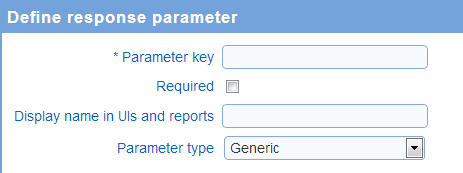
A response parameter comprise the following:
Parameter key: The key for the parameter as it will appear in the URL (i.e., ...&key=value&...)
Display name in UIs and reports: the name for the parameter to use when showing the parameter in reports and when browsing responses in the browsing user interface.
Required flag: when a parameter is set as required, a value must be present in the URL for the parameter to take the survey. If the parameter if of type data entry person identifier and there is already a person identified as entering the data for the response, then a value for the parameter is not required in the URL, even if the required flag is set for the parameter.
Parameters are added, edited, and deleted through the New, Edit, and Delete tools, respectively.
There are four types of parameters:
Generic: This is the default type of parameter. It is suitable in most cases
Response identifier: The value for the parameter identifies a response uniquely. The response with the specified value for the parameter will be resumed if it exists already.
Data entry person identifier: The value for the parameter identifies the person entering the data on behalf of a respondent. The value for the parameter must match field 'External User ID' for the user. The user identified must have 'Bulk data' privileges to be able to enter the response data. Furthermore, the survey must be setup to allow bulk data entry. See also Survey - Responses and Adding or setting up an organization.
Random: The value for the parameter is a randomly assigned value greater or equal to 0 and strictly less than 1. Random parameters can be used to segment respondents using conditions. For example, questions can be shown based on a random parameter by creating question show & hide elements with show/hide conditions based on the value of the parameters (e.g., setting the condition to "less than" 0.66 will result in the question being show to 2/3 of the respondents). Conditions based on random parameters can be used where ever conditions are available (e.g., page conditions, skip logic, response filters, ...)
The value for parameters can be displayed to respondents. See How to embed parameter values in surveys for more details.
See also How to work with tables