|
Skip logic
|   |
Skip logic is one or more set of conditions that trigger skipping ahead in a survey. Skip logic is defined at the level of a survey page. Each skip logic condition group defined in a survey can trigger the skipping ahead to a subsequent page in the survey, if the condition group if true for a response. Whether or not the skipping occurs is based on the respondent's answers for question in page preceding the page with the condition. An alternative to skip logic is page conditions.
For example, in a survey about smart phone usage, the first page might contain a question asking the respondent if they own a smart phone. If the respondent answered "No" to the question about ownership of a smart phone, a skip logic condition group can be used in this page to bring the respondent to the completion page for the survey, thereby skipping all other pages in the survey.
Skip logic is added to a page from the Page detail screen using tool Page Skip Logic. The tool provides access to the skip logic list.

Skip logic list
A survey page may define multiple skip logic elements. When respondents presses the "next page" button while responding to the survey, the skip logic element are evaluated in the order in which they appear in the skip logic list. The first skip logic element with conditions that are true is executed and the survey is skipped to the location specified in the skip logic element.
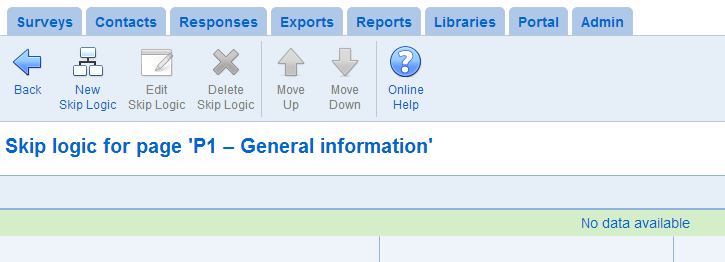
- New Skip Logic: Creates a skip logic element for the current survey page. See skip logic add or edit below.
- Edit Skip Logic: Modifies the skip logic element currently selected. See skip logic add or edit below.
- Delete Skip Logic: Deletes the skip logic element currently selected. The deletion cannot be undone.
- Move Up/Down: Moves the skip logic element one position either up or down in the list of skip logic elements
Skip logic add or edit
The destination and conditions for a skip logic element are defined in the skip logic add or edit page.
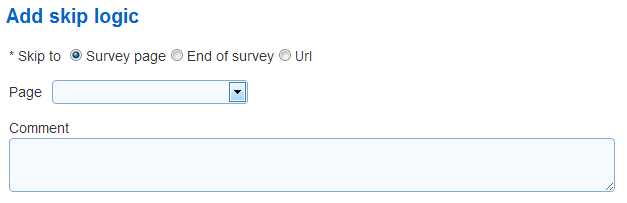
- Skip to: Defines the destination to skip to when the skip logic conditions are true.
Survey Page: skip to a page in the survey that is after the page with the skip logic element
End of survey: skip to the end of the survey. If the survey has a completion page, the skip will bring the respondent to the completion page.
Url: skip to the specified URL.
- Comment: Contains any design notes (e.g., the rationale for the skip logic element). The comment is not shown to participants.
For details on how to create the condition for a skip logic element, see Conditions.
See also How to work with tables, Page detail, Page conditions, How to: Work with page conditions and skip logic, How to: Use condition operators