|
Survey - Responses
|   |
The responses tab contains options to control the number and behavior of responses for the survey.
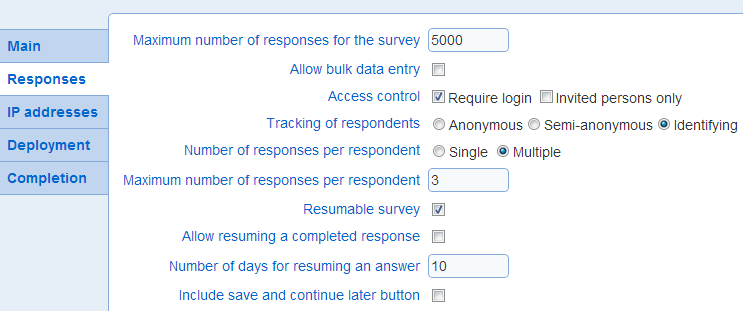
- Maximum number of responses
Caps the number of responses for the survey. Only completed responses apply toward the limit. Partial responses do not apply toward the limit. Note that this parameter can affect the ability for respondents to resume answering a survey. Once the limit is reached, resuming partial responses is no longer allowed.
If the parameter is not defined, no limit applies to the number of responses for the survey. Independently of the this field, the maximum number of responses allowed for a survey can depend on the maximum number of responses allowed monthly for an organization. If the maximum number of monthly responses is reached for the organization, no new response will be gathered for the survey until the next month.
Controls if users with privilege Bulk data entry (see also User privileges) can enter responses for the survey. If the option is set, users with Bulk data entry privilege will see the survey in the portal and will be able to take the survey an unlimited number of times as long as a the survey is opened and the maximum number of responses for the survey is not reached. Setting the bulk data entry option allows an alternate manner in which responses are entered for the survey. Responses can also be entered directly by respondents subject to the other response settings for the survey when the bulk data entry option is set.
Defines who can respond to the survey. The two options are:
Require login: Respondents must have an active account to answer the survey. When a respondent points their browser to the URL for the survey, they will be redirected to the login page and will have to enter their user name and password prior to being allowed to answer the survey.
Invited persons only: Respondents must belong to a list of invited people. When this option is set, respondents must initiate their response to the survey from the link embedded in the invitation email that was sent to them.
Note that the two options are not mutually exclusive.
Survey access control and invitations
1. If the survey is set for access control based on invitations, then the only means to take the survey is by clicking on an invitation link in an invitation email.
2. If the survey is set for access control based on login and not based on invitations, then any user with a login to Novi Survey can take the survey. If the user starts the survey from an invitation link but enter a login that does not match the person specified by the invitation, then the response will be tracked to the user as identified by the login and not to the invitation.
3. If the survey is set for access control based on login and on invitations, then the user identified by the login must match the person for the invitation. If the login and the invitation do not match, the system will display an error (see also Interpret errors that can occur when taking a survey).
Determines the type of identifying information that Novi Survey will track for the respondents. The options are:
Anonymous: The respondents are not tracked. Multiple responses from the same person to the survey cannot be identified.
Semi-anonymous: Respondents are tracked through a system generated ID only. The ID allows to track multiple responses to the survey from the same respondents and responses to multiple surveys from the same respondents. The ID is saved on the respondents computer as a cookie.
Identifying: Responses are associated to identifying information about the respondent. Identifying information includes at a minimum the respondent's first name, last name, and email. Selecting this option requires the selection of at least one of the access control options described above.
Note that independently of the option chosen for this field, a survey can include a demographic question. Even if the anonymous or semi-anonymous option is selected, identifying information about the respondents can still be gathered through the demographic question.
- Number of responses per respondent
Determines if a respondent can respond to the survey more than once. The options are available if the tracking of respondents is Semi-anonymous or Identifying. The options are:
Single: A respondent may respond to the survey only once. If the tracking of respondents is Semi-anonymous and cookies are not enabled on the respondent's computer or the respondent uses different computers to respond to the survey, Novi Survey will not be able to tell that the respondent is the same person.
Multiple: Respondents can answer the survey more than once
- Maximum number of responses per respondent: Defines the maximum number of responses to the survey for a respondent. The option is available only if the number of responses per respondent is set to Multiple.
Determines if a respondent can continue responding to the survey after they have stopped previously without reaching the end of the survey. The option is available only if the tracking of respondents is semi-anonymous or identifying. Note that if the tracking of respondents is Semi-identifying, the system will not be able to let a respondent resume answering the survey if cookies are disabled on their computer or they are using several computers to answer the survey.
- Allow resuming a completed response
Determines if a response that is completed can be resumed. This option is available only when the resumable survey option is set.
If the option is set, a participant returning to the survey will always edit the same response unless option number of days for resuming an answer is set and the specified time span has passed since the response was started.
- Include save and continue later button

Determines if a button will be added to the survey that allows participants to save their response and be presented with a message informing them they can resume their answer at a later time.
This option is available only when the survey is resumable.
The message shown after they press the save and continue later button is defined by field "Save and continue later message".
The text shown in the save and continue later button may be customized in the messages screen for the survey.