|
Invitation group - Invited contacts
|   |
The invited person lists tab defines the prospective respondent invited by the group.
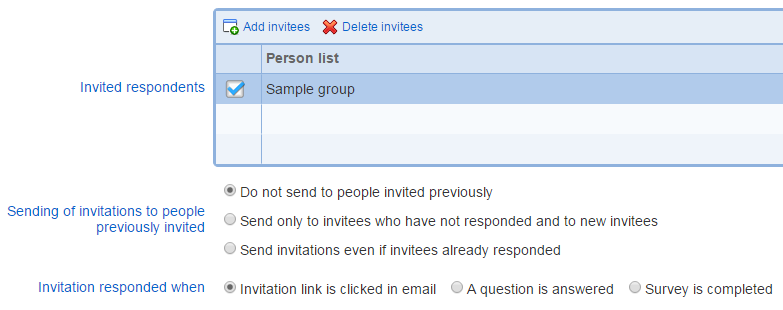
Invited respondents
Defines the people invited to take the survey. Invited respondents are entered as lists from the address book. Respondents can be added one a time to the invitation group by using option "Add person to list". Note that when "Add person to list" is selected, respondents added to the invitation group are also added in a list in the address book.
To start adding respondent, use the "New" tool. To remove a list of people from the invitation group, use the "Delete" tool.
Sending of invitations to people previously invited
Defines if email invitations other than reminders can be sent multiple times to the same respondent.
The system considers that someone has been invited to take a survey if at least one initial invitation has been processed for this person. In most cases, unless an invitation group is set to not send email, the processing of an invitation results in an email being sent to the person.
For most surveys, it is generally not advisable to send more than one invitation email to a single person. For surveys where respondents are expected to answer multiple times at regular time intervals, it is useful to allow multiple invitation emails to the same person.
The options available for this field are:
- Do not send to people invited previously: if this option is checked, then no email will be sent to prospective respondents invited previously.
- Send only to invitees who have not responded and to new invitees: if this option is checked, invitations will be sent to people not yet invited and people invited previously but who have not yet responded. Whether or not a person is considered to have responded is determined by option 'Invitation responded when'. Consequently, people who have started responding to the survey but have not completed the survey may or may not be invited again. If 'Survey is completed' is selected, they will be invited again. If either 'Invitation link is clicked in email' or 'A question is answered' is selected, they will not be invited again.
- Send invitations even if invitees already responded: if the option is checked, multiple invitations to the same person are allowed always, regardless of whether they have responded to the survey or not.
Minimum number of days between invitation messages
Defines the minimum number of days between the sending of initial invitation messages from the group and prior initial and reminder messages sent for the survey. This options applies to an invitation group and can differ between invitation groups for the same survey. However, the invitation and reminder messages sent for all invitation groups for the survey influence when an initial invitation is sent from a group with this option set. The option ensures that the minimum number of days between an initial invitation message sent from the group and all initial invitation and reminder messages sent to an invitee is not less than the value specified. The option influences initial invitation messages only. Reminder messages are not impacted.
Example: the option is set to 10 days and the initial invitation release date is April 1st. If invitee received a reminder email from another invitation group on March 25th, then the initial invitation will be sent from the group to this invitee 10 days after March 25th on April 4th rather than on April 1st.
Specifies the logic for considering that the respondent has responded to the invitation sent to them. Note that when the participant has responded to an invitation, no further reminders will be sent to them.
- Invitation link is clicked in email: the respondent has clicked on the invitation link in the email and has reached the first page in the survey.
- A question is answered: the respondent has answered at least one question in the survey.
- Survey is completed: the respondent has reached the end of the survey.