|
Invitation group - Schedule
|   |
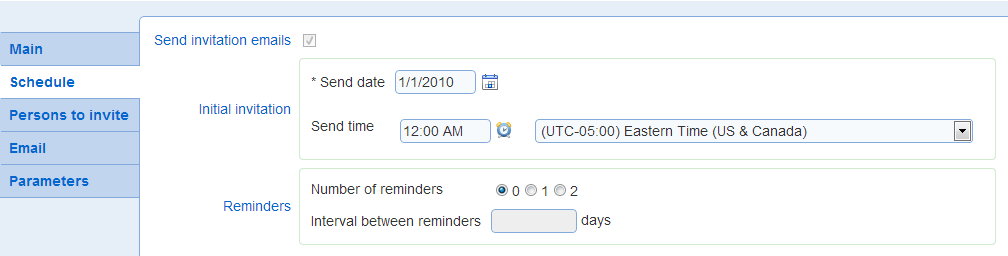
The schedule tab defines the date and time when the initial invitation email will be sent to respondent and the frequency of reminder emails.
- Send invitation emails
Specifies if emails should be sent for the invitations in the group. When this option is not selected, invitations are created in the system with a unique link (URL) for each contact. However, no email is sent to the contacts for the invitations. The invitation links can be obtained from the invitation report for the group. The links can be communicated to the respondents through a 3rd party mechanism. Also, the invitation identifier provided in the invitation report can be used in the landing page for the system to take the survey by typing the identifier in the Survey ID field.
- Initial invitation
Defines the date and time when the initial invitation will be sent for the group. Initial invitations will be sent for open surveys only.
The time of the day when the email should be sent is defined in 15 min increment. To set the time, click on icon  and choose the time zone for which the time is defined. Novi Survey will try to send the invitation email within 15 min of the time defined for the list. However, if there are circumstances (e.g., failure of the email server) when the invitation email cannot be sent at the specified time. In that case, the system will retry sending the email irrespective of the value for the Email send time.
See also: Invitation group status
- Reminders
Defines if reminders will be sent to prospective respondents. If set, reminders will be set at the frequency specified by field Interval between reminders and Number of reminders.
Settings for email reminders apply to all lists of invited contacts.
Reminders will not be sent to respondents who have responded to the invitation. Novi Survey provides several ways to track a response to an invitation. See option Invitation responded when for more details.
If reminders parameters are changed after some emails are send for the group, then the parameters will take effect based on the status of each invitation in the group.
For example, if an invitation was sent 5 days ago and the interval between reminders is changed from 10 days to 3 days, then an invitation email will be sent for the invitation during the next invitation processing cycle.