Novi Survey Home
|
Invitation group - Main
|   |
The main tab defines general properties for the invitation group.
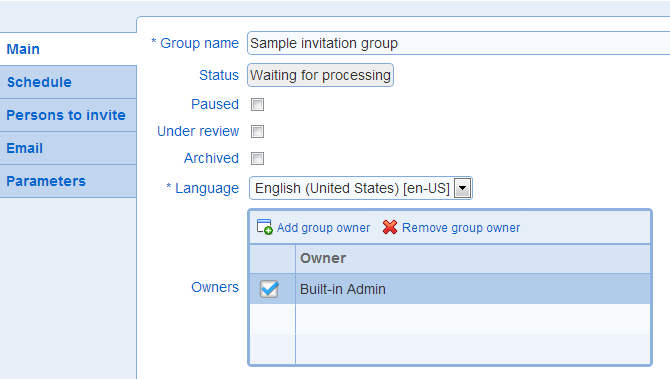
- Group name: The name for the invitation group. The name is unique within invitation groups for the survey.
- Status: Read only field indicating the status for the invitation group. See also: Invitation group status
- Pause: Indicates the activity status for the invitation group. If the option is selected, the invitation group is inactive. Otherwise, the invitation group is active.
See also: inactive invitation groups
- Under review: Indicates that the invitation group is currently inactive until it is reviewed by a system administrator. Groups can be placed under review for assessment of the group compliance with anti-span policies. No invitation email are sent for a group under review. Changing of the Under review of a group requires system administrator privileges.
- Archived: Sets the status of the invitation group as an archived record. Archival of the invitation group will result in the group not being displayed by default in the invitation group list. See also Work with tables.
- Language: The language for the invitation group. The language must be one of the languages defined for the survey.