|
Invitation group list
|   |
Invitations for a survey are managed in groups. The list of invitation groups for a survey is available from the Invitations tool in the ribbon menu.

The invitation group list shows the invitation groups for which you are an owner. Each invitation group corresponds to one invitation email to be sent at a specified date and time to a group of invited people.
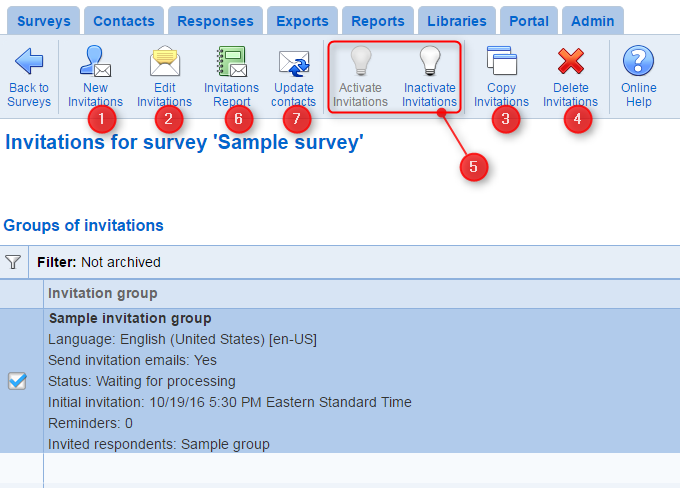
1. To create a new invitation group, use tool New Invitations. The tool is the starting point for inviting people to take the survey.
2. To modify an existing invitation group, use the Edit Invitations. After an invitation group starts processing, editing of the settings for the group is limited. See 'Invitation groups status' below for more detail.
3. To copy an existing invitation group, use the Copy Invitations tool.
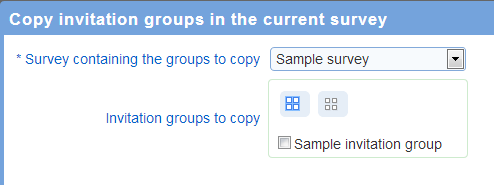
The tool allows the creation of a new invitation group into the current survey from a copy of an invitation group for the current survey or for another survey. To copy an invitation group for another survey into the current survey, select the survey that has the invitation group to copy in the copy pop up window. Then, select the invitation groups to copy. The copies of the invitation groups will be added to the current survey.
4. To delete an existing invitation group, use the Delete Invitations tool. The tool is available for invitation group with status of "Setup" only.
5. Activate or Inactivate
To activate an inactive invitation group, use the Activate Invitations tool. Activating an invitation group may trigger the release of invitation emails depending on the status for the group and for the survey.
6. Invitation report
To access overall statistics and detailed reports for the invitations for the group, use the Invitations report tool. The tool is not available until the invitation groups processing has started.
7. Update contacts
Invitation groups are based on list of invited contacts. These contacts are managed in the Contacts tab. When the processing of an invitation group starts, the contacts for the lists included in the group are converted to individual invitations. After the conversion is completed, changes in the lists of contacts are not reflected automatically in the invitation group. The ribbon tool 'Update contacts' synchronizes the invitations in the group currently selected with the contacts for the list included in the group. When the tool is used, new invitations are created for contacts added to the contact lists since the invitation group was created. Invitations corresponding to contacts removed from the contact lists are canceled. A common use of this function is to send invitations to contacts newly added to a contact list without creating a new invitation group.
Invitation groups status:
- Waiting for processing: The invitation group is created for the survey. The send time for the initial invitation is not reached or the survey is not opened (i.e., the status for the survey is not open or the current date and time is not within the open and close dates defined in the survey setup). No invitation has been sent for the invitation group. The invitation group can be modified or deleted. Any change to the person lists for the invitation group will be reflected when the invitation group is processed.
- Processing: The survey is opened and the initial send time is reached for the invitation group. The group cannot be deleted or modified. The group can be paused or placed under review. Changes to the person lists in the address book will not have any impact on the invitation emails for the group unless the invitation group is saved explicitly. As the group undergoes processing, invitation emails will be sent by Novi Survey to the people in the address book lists for the invitation group. The status for the group will remain "Processing" until all invitations and reminders are sent for the group. Novi Survey sends invitation email in batches at regular time intervals. Depending on the size and composition of the address book lists for a group, sending of all of the initial invitation emails (and of all the reminders) may take some time.
- Completed: The processing of the invitation group is completed. No further email will be sent by Novi Survey for the group. The group cannot be edited or deleted. Its activity status cannot be changed directly. However, saving the group explicitly will changed the status of the group back to "waiting for processing". This mechanism allows for inviting new people to answer a survey using an preexisting invitation group.
Forwarding of replies to invitation emails:
When prospective participants reply to invitation emails, their reply is always forwarded to the email addresses of the invitation group owners. Additionally, if the invitation group specifies a 'from' email address in the email tab, replies to invitations will be sent to that email address also. Furthermore, if a mailbox is defined in the system configuration for processing of bounced invitations, the invitation 'from' email defined in the system configuration will be added to the recipients of the replies.