|
Substitution pipes
|   |
Substitution pipes provide a means to transfer answer data automatically from one question to either a question or a presentation element in a subsequent page, or to a report. The element or report that receives the data is the pipe destination. The question that provides the data is the pipe source. Any element and single response report can be a pipe destination. Any question can be the source of a pipe. Furthermore, the source of a pipe can be narrowed to a specific sub-element of a question (e.g., an answer or a matrix row-matrix column combination).
Example:
Consider a multiple choice question "What is the brand of your smart phone?" where the answer is chosen amongst a list of brands.
Another question may ask "Are you satisfied with your [answer from phone brand question] phone?".
A question pipe can transfer the answer to the response from the brand question to the text for the second question. If a respondent choose answer "Motorola" to the first question, they will see "Are you satisfied with your Motorola phone?" when they reach the second question.
A question pipe is created using shorthand notation in any text field in the destination question. The shorthand notation for the question must be enclosed in brackets. In the example above the Question text field for the second question would be as shown below:

Where P2Q2 refers to question 2 of page 2 in the survey, which is the question asking about phone brand.
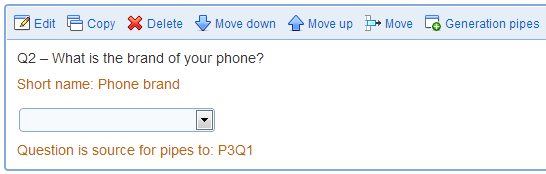
In page details for surveys, questions that are the source of pipes are identified as such as illustrated above.
A pipe is deleted simply by remove the shorthand notation to the source question in the destination question (e.g., changing the question text to "Are you satisfied with your phone?" in the example above).
The destination of question pipes is not limited to question names. Any text label in a question can be the destination of a pipe (e.g., matrix row name, open ended field label, rating or ranking field label, ...). Additionally, the title, introduction and conclusion of reports, report sections and report elements and the completion message, completion email subject and completion email body of surveys can be the destination of a pipe.
Question pipes are allowed only between elements in the same survey and between question and reports for the survey containing the question. The existence of a pipe between two questions will prevent the move of either of the questions to another survey or to a library.
Pipes may become invalid under the following circumstances:
- the question at the source of the pipe is deleted
- the question at the destination of the pipe is located on the same or on a prior page as the question at the source of the pipe. This situation may occur when either of the two questions are moved within the survey.
To correct an invalid pipe, either correct the ordering of the questions or delete the pipe.
Invalid pipe are detected and listed when a survey is validated. If a survey with invalid pipes is deployed, respondents will see "invalid" at the location of the pipe destination when they view the destination question.
Note that if the question at the destination of the pipe is deleted, the pipe simply ceases to exist.
Question pipes are available only in surveys and reports and not in libraries.
The text displayed by a pipe can be customized by setting the 'default', 'data', 'format', 'sort-by', and 'sort-order' attributes:
- attribute 'default': the attribute defines the text displayed for the pipe should the pipe be empty. An empty pipe can result from the participant not answering the question at the source of the pipe. In such a case, the text displayed for the pipe will be the value specified by the 'default' attribute.
Example: [P2Q2, default='no selected value'] is a pipe with default value set to 'no selected value'.
- attribute 'data': the attribute defines the text for each item that contributes to the text displayed by a pipe. For example, if a matrix of radio buttons is the source of a pipe, the text contribution of each checked radio button to the pipe may be set to the matrix row text or matrix column text for the cell with the radio button. Permitted values for the 'data' attribute are:
- 'option': the pipe includes the text for the option selected. This value is available for multiple choice questions and matrices of drop down lists.
- 'text': the pipe includes the text typed by the participant. This option is available for open ended questions, and matrices of text boxes.
- 'row heading': the pipe includes the text for the row in the matrix corresponding to the answer element provided by the participant.
- 'column heading': the pipe includes the text for the column in the matrix corresponding to the answer element provided by the participant.
Example: [P2Q2, data='option'] is a pipe that will display the option(s) selected by the participant in the question at the source of the pipe.
- attribute 'format': the attribute defines the formatting of the pieces of text that contribute to the pipe. For example, when piping from the multiple choice question with more than one permitted selected, the pipe will contain multiple pieces of text. These pieces of text can be either joined with commas or presented as a list of bullets.
Permitted values for the 'format' attribute are:
- 'comma': the text elements for the pipe are joined with commas
- 'paragraph': each text element for the pipe is shown as a paragraph, preceded by a line break
- 'bullet': the text elements for the pipe are presented as a list of bullets
- 'number': the text elements for the pipe are presented as a numbered list
Example: [P2Q2, format='comma'] is a pipe that will display the text fragments contributing to the pipe with a comma as a separator.
- attribute 'sort-by': the attribute defines how the values for the question referenced in the pipe should be sorted. The attribute influences the output of pipes for questions where more than one value can be entered by the respondent for the question (e.g., a multiple choice question allowing the selection of multiple options, open ended questions with multiple fields, or a matrix questions). Permitted values for the 'sort-by' attribute are:
- 'item': the responses to the question are sorted by on the order of the items composing the question. For multiple choice, open ended and ranking questions, the items are the answers for the question. For matrices, the items are the rows and the columns for the segments in the matrix. For matrices the row association is considered before the segment and column association to sort the values for a pipe. The 'item' value is the default for the 'sort-by ' attribute.
- 'value': the textual, numeric, or date values for the answers to the question. For questions with numeric or date answers (i.e., open ended questions with numeric fields, rating or ranking questions, or a matrix segments of type rank of containing dates or numbers), the values are sorted using comparisons of numbers or dates as appropriate. When the question contains textual values (e.g., open ended questions with textual fields), the values are sorted using text comparisons.
Example: With P2Q2 being a ranking question, [P2Q2, sort-by='value'] is a pipe that will display the answers selected by the participant order in increasing order of the rank assigned to each answer. If the answers to P2Q2 are TV = 5, Phone = 3, and Game console = 6, then the answers will be sorted based on values 5, 2, and 6 as Phone, TV, and Game console.
- attribute 'sort-order': the attribute defines the sort order of the answers to the question. The impact of the attribute depends on the choice made for the 'sort-by' attribute described above. As the answers are sorted based on the value of the 'sort-by' attribute, the direction of the sort is determined by the 'sort-order' attribute. Permitted values for the 'sort-order' attribute are:
- 'ascending' or 'asc': the answers to the question provided by the respondent as defined by the 'sort-by' attribute are sorted in increasing order. The 'ascending' value is the default for the 'sort-order' attribute.
- 'descending' or 'desc': the answers to the question provided by the respondent as defined by the 'sort-by' attribute are sorted in increasing order.
Example: With P2Q2 being a ranking question, [P2Q2, sort-by='value', sort-order='descending'] is a pipe that will sort the answers in descending values of rank. If the answers the P2Q2 and TV = 5, Phone = 3, and Game console = 6, then the answers will be sorted as Game console = 6, TV = 5, and Phone = 3.