Novi Survey Home
|
Move questions and visual elements
|   |
The element mover allows to mover questions and presentation elements from a survey page or a library into the same or another survey page or library. The move is initiated from the either the page detail or the library detail. After the move is complete, the element is no longer present in the survey page or library it was moved from and is found in the survey page or library it was moved to.
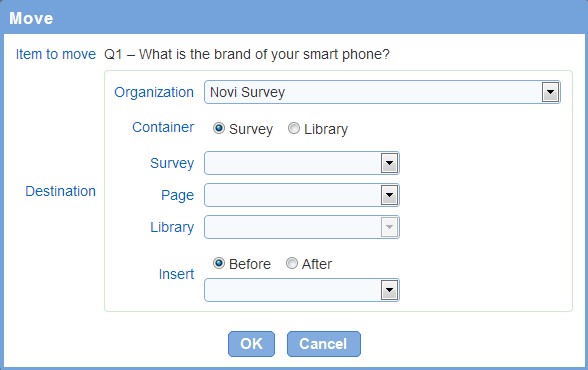
The languages defined for the question and presentation element to move may be different from the languages for the survey or library where the element should be copied. When such a language mismatch occurs, the system will display a warning prior to performing the copy operation.
- Organization: The organization where the element will be moved. The field is available only when you have access to more than one organization.
- Container: The destination where the element will be moved
- Survey and survey page: The survey and page where the element will be moved. The field is available only when field container is set to Survey. This field is required when it is available.
- Library: The library where the element will be moved. The field is available only when field container is set to Library. This field is required when it is available.
- Insert: Defines the position where the element will be inserted in the selected survey page or library. The position is defined relatively to an existing element.
- Add languages to library: When the destination for the move is a library and the languages for the library do not include some of the languages for the element, this option specifies if the missing languages should be added automatically to the library. Note that no automated translation of the text for the elements in the library is performed. See also Edit library.