Novi Survey Home
|
Login
|   |
The fields in the login screen depend on the System configuration.
The system include a standard login screen and a login screen shown to respondent trying to access a survey that requires login. The difference between the 2 login reside in the branding of the screen and in the ability to register for a new login account directly from the login page.
Standard login screen
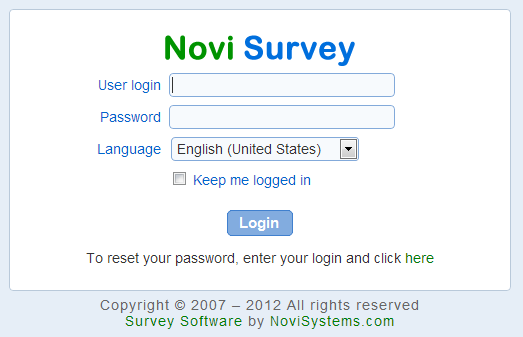
- User login: The login name for the user. Depending on the system configuration, the login name may be the user email address, a login name assigned by the organization administrator, or Windows domain login name.
- Password: The password for the user. If user login is performed through a Windows directory, the password is the same as the network password for the user.
- Domain: The windows domain to log into. This field is shown only if the system is configured to integrate with a Windows domain. The domain is a read-only field that cannot be changed.
- Language: The language to use in the user interface. The language will be saved on the local computer and retrieved for subsequent logins. This language is not related to the languages for the surveys, which are managed independently for each survey (see Set up survey - Main and Messages). The language can also be set from the User profile page after the user is logged in.
- Keep me logged in: Saves the login information on the local computer. Do not select this option if you are using a shared computer. When the option is selected, you will able to navigate to a page in the system without entering your user name and password. This option may not be available depending on the configuration for the system.
- Reset your password: Allows resetting your password. A new password will be sent to your email address. If you do not have access to you email address, contact your system administrator and have them change the email address on record for your novisurvey.net account. See also Adding or setting up an organization.
Login screen for survey participants
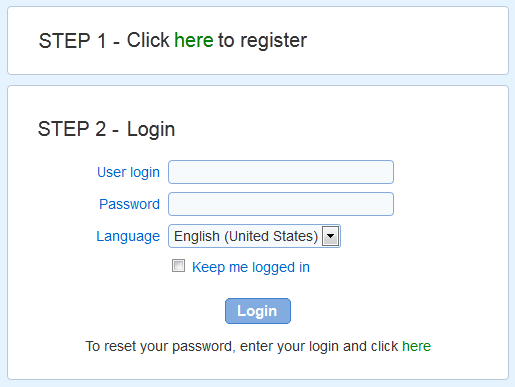
- Register for an account: Allows the creation of a new account on the system. The link is shown if users are allowed to self-register. For help regarding the registration page, see page User profile.