|
Create or setup a library
|   |
To create a new library or setup an existing library, see Library list.
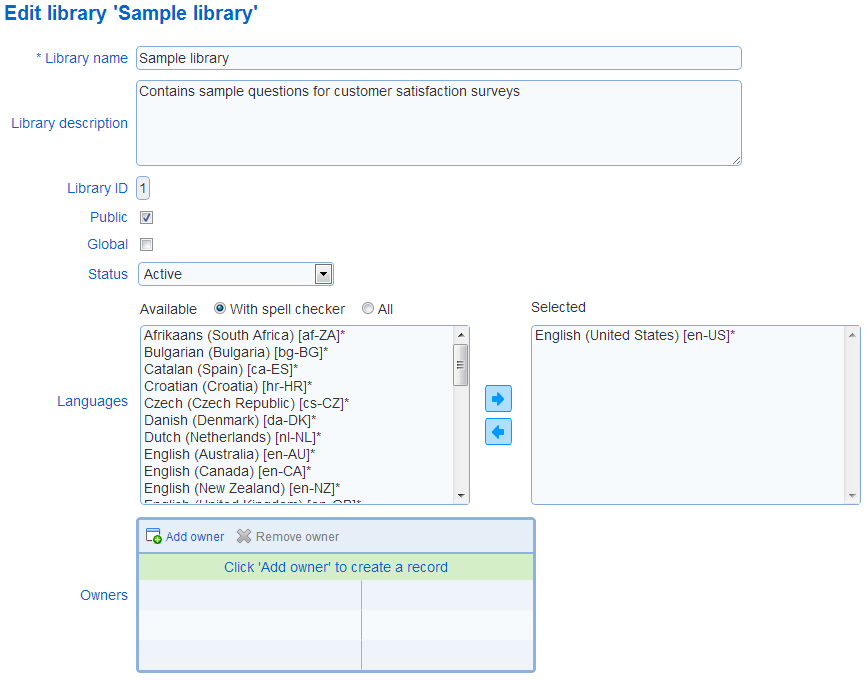
- Library name: Defines the name of the library
- Library description: Defines the description of the library. The description is shown in the library detail.
- Global: Specifies if the library is global. Global libraries are available to all users, independently of their organization. Only system administrators can modify this parameter
- Status: Specifies the status for the library. The status for a library can be:
1. Active: The library can be edited and the content of the library can be changed. Questions and presentation elements in the library are available for inclusion in surveys.
2. Frozen: The content of the library cannot be changed (i.e., the questions and presentation elements in the library are frozen). Questions and presentation elements in the library are available for inclusion in surveys.
2. Frozen & Inactive: The library is frozen and its content cannot be included in surveys.
The system supports multilingual libraries (i.e., libraries where the questions and presentation elements in the library are defined for more than one language). The field languages defines the languages for the library. For example, if English (United States) and French (France) are selected, questions in the library must be defined in English and French.
A least one language is required.
To select languages click, use button  to move languages to the selected box and button
  to deselect languages.
By default, the list of available languages shows only languages for which a spell checker is available. To show all languages, click on the All option above the list of available languages. Note that languages for which a spell checker is available have an asterisk (*) after their name.
When a language is added to a library that has questions and presentation elements, the text for each existing question and presentation element will need to be edited for the new language (see Questions and Presentation elements)
When a language is removed from a library that has elements, the text or graphic for the existing elements for the language will be deleted.