Novi Survey Home
|
Edit survey page
|   |
This screen contains the fields to set the name and introduction for a survey page. To manage the questions in the page, see the survey page list.
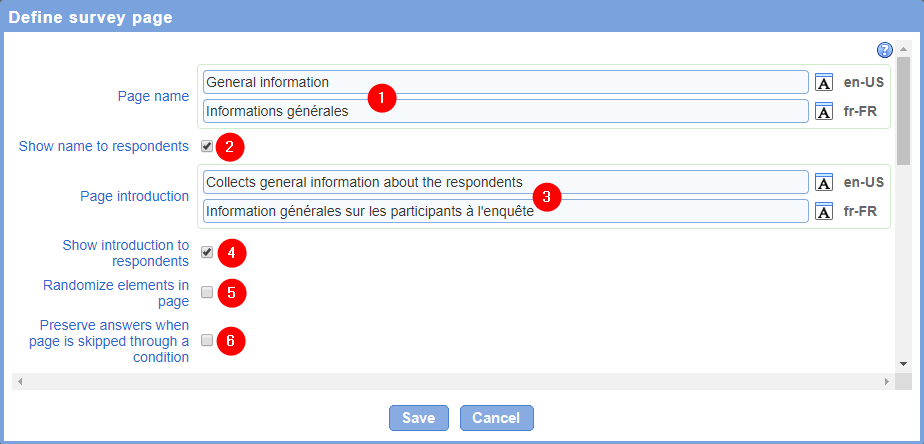
- Page name: The name of the page. The name of the page is shown to respondents at the top of the question area if option Show name to respondents is set. The page name is mandatory.
- Show name to respondents: Determines if the page name will be shown to respondents when take the survey.
- Page introduction: The introduction for the page. The introduction for the page is shown to respondents below the page name at the top of the question area if option Show introduction to respondents is set
- Show introduction to respondents: Determines if the page introduction will be shown to respondents when take the survey.
- Randomize elements in page: Determines the order of the questions and presentation elements in the page when respondents take the survey. If the option is not selected, the elements will appear in the order in which they are defined in the page (see Page detail). If the option is selected, the elements will be presented in a random order. Note that both the order of questions and of presentation elements will be randomized. Therefore, it is usually advisable to avoid including presentation elements in the page if the option is selected.
- Preserve answers when page is skipped through a condition: Determines if answers entered for questions in the page are deleted from a response when the page is either hidden through a page condition or skipped over through a skip logic element. Setting this option is useful in situation where the page contains questions filled by someone other than the initial respondent (e.g., a manager filling out information related to a response entered by an employee).
- Script (javascript): Defines javascript code that will be run in the page after the is loaded in the browser. The javascript code will be run every time the page is loaded including after a validation error is detected in the page. Javascript code may be used for integration with 3rd party systems and for implementing custom logic not supported through other means (e.g., validation logic or special dependencies between questions). Use of custom javascript through this field is available for only certain licenses to the software.
- Script (on-load): Defines a python script that will be run on the server running the application when the page is generated for a response. The script will run for the page for every response. The script may be use to modify or enhance the content of the page or for integration purposes with 3rd party systems. Use of a server script through this field is available for only certain licenses to the software.
See also How to use the rich text editor, How to spell check the content of a page