|
Use the rich text editor and spell checker
|   |
Text fields that can be edited in the rich text editor are identified by icon at the right of the field.

Pressing on the icon activates the rich text editor.
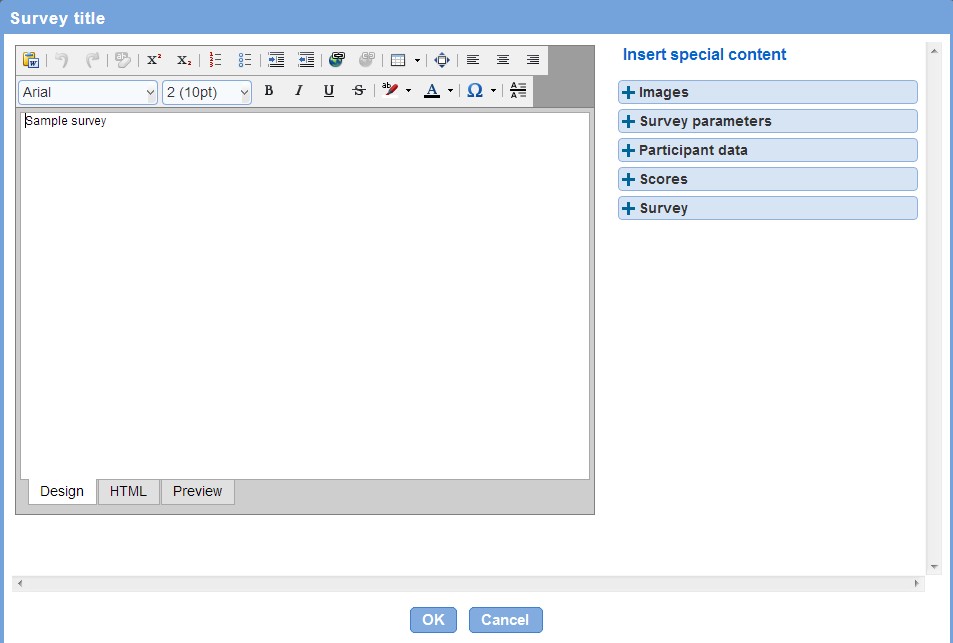
Formats can be applied to the text in the editor through the icons in the toolbar above the editor. When the formatting is complete, press OK or press Cancel to discard the formatting.
Fine level control over the HTML generated by the editor is available from the 'HTML' tab at the bottom of the editor.
After formats are applied to text in a field, the text is modified to include the formatting:

To visualize the text with the formatting, place the mouse over the field and a pop up will appear below the field.

Important: To paste text from Microsoft Word, use the special tool  provided for that purpose. Pasting text directly from Word without using the tool will result in an error message when the page with the text is saved.
Special content
Special content such as images or score values or interpretation can be added in the rich text editor by using the "special content" section available to the right of the editor. The type of special content available varies depending on survey configuration and the type of field associated to the editor (e.g., the special content for the survey name is not be the same as the special content available for the survey completion message).