|
Multiple choice question
|   |
Multiple choice questions offer respondents with predefined answers and allow them to select 1 or several of the answers. Multiple choice questions can be composed or radio buttons, check boxes, or comprise a drop down list.
See Adding a new question for help on fields common to all question types.
Main tab
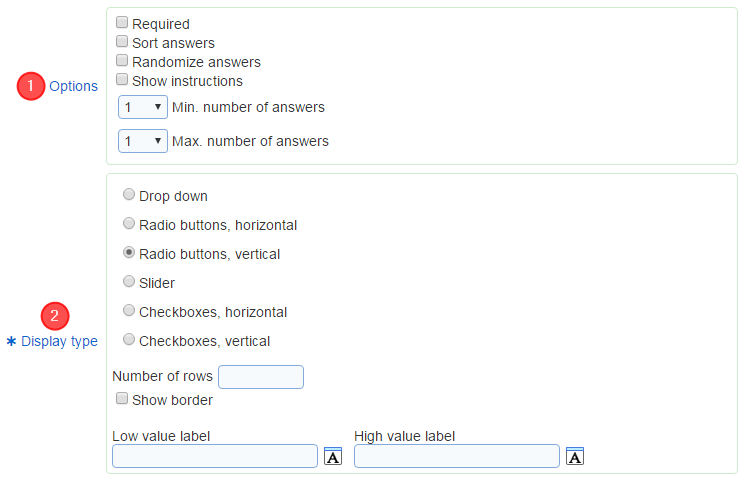
1. Options
The following options are provided for multiple choice questions
- Required: specifies if an answer is required for the question. If the option is set, respondents will not be able to move to the next page in the survey until they answer to the question.
- Sort answers: specifies that the answers for the question should be presented to respondent sorted in ascending case insensitive alphabetical order. This option and option "Randomize answers" are mutually exclusive (i.e., they cannot both be selected).
- Randomize answers: specifies in the order in which the answers are shown for the question. The order is either fixed or randomized when respondent access the page with the question.
- Show selection instructions to respondents. When the maximum number of options that can be chosen is greater than 1 and the option is checked, a message "Select from X to Y options" will be displayed to respondents, where x is the minimum number of answers that can be selected and y is the maximum number of answers that can be selected.
- Minimum number of selected answers: the minimum number of answers that must be selected if the respondent answers the question.
- Maximum number of selected answers: the maximum number of answers that can be selected if the respondent answers the question.
2. Display type
Specifies how the answers should be presented to respondents. The options available are:
- Drop down: The answers will be shown in a drop down list. This option is available only if fields "Minimum number of selected answers" and "Maximum number of selected answers" are set to 1.
- Radio buttons, horizontal: The answers will be shown as radio buttons, arranged horizontally in the page. This option is available only if fields "Minimum number of selected answers" and "Maximum number of selected answers" are set to 1.
- Radio buttons, vertical: The answers will be shown as radio button, arranged vertically in the page. This option is available only if fields "Minimum number of selected answers" and "Maximum number of selected answers" are set to 1.
- Slider: The answers will be shown with a slider. This option is available only if fields "Minimum number of selected answers" and "Maximum number of selected answers" are set to 1.
- Check boxes, horizontal: The answers will be shown as check boxes, arranged horizontally in the page.
- Check boxes, vertical: The answers will be shown as check boxes, arranged vertically in the page.
For any options other than "Drop down" and "Slider", it is possible to specify the number of columns or rows used to arrange the radio buttons or check boxes. For horizontal layouts, the number of columns can be specified. For vertical layouts, the number of rows can be specified. If the number of column (or rows) is not set, the radio buttons or check boxes will be arranged in one row or one column.
Option Show border determines if a border is drawn around each option in the question. If the border is shown, the color border is the same as the matrix border color for the template associated to the survey. This options is available when the display type is set to "Radio buttons" or "Check boxes".
Options Low value label and High value label are available for display types other than "Drop down". The text entered in these fields is shown at the ends of the scale defined by the answers for the question.
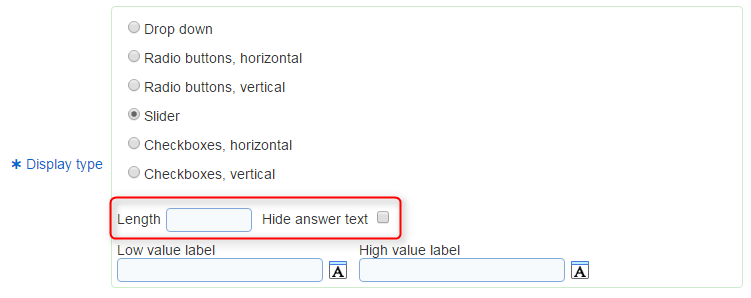
Slider display type: When the display type is set to "Slider", additional options available are:
- Length: Specifies the length of the slider in pixels.
- Hide answer text: Specifies the visibility of the labels set for the answers in the answer tab.
Answers tab
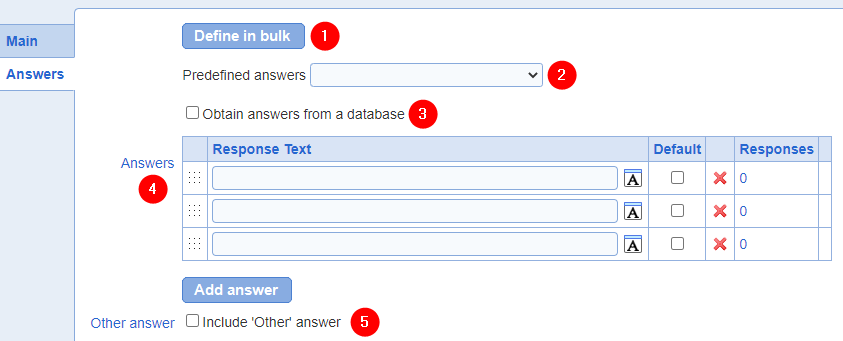
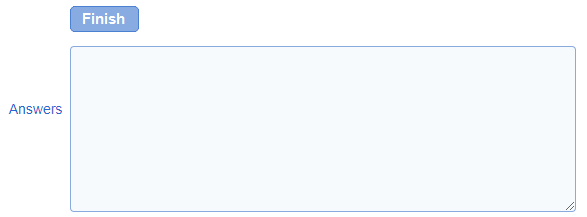
Define in bulk switches the answer definition mode such that answers can be pasted in bulk rather than typed individually into the answers grid. After defining answers in bulk, the mode must be switch back before the question can be saved. This is done by pressing "Finish" while in bulk mode
2. Predefined answers
Provides common sets of predefined choices. When a value is selected in the drop down list, the choices corresponding choices are populated in the Answers table (see below). Predefined answers are available for the languages supported in the user interface. For other language, Answers available for the question can be defined directly in the Answers table.
3. Obtain answers from a database
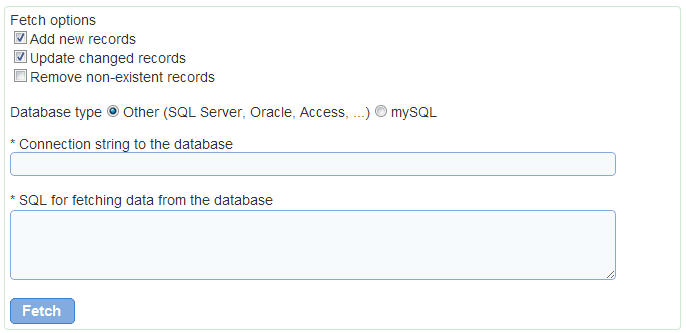
To import answers from an external relational database, select option Obtain answers from a database. They will not be synchronized in real time when respondents take the survey. Answers will be copied to the database for Novi Survey at the time of import. Synchronization of the Answers in Novi Survey with new or modified data in the external database necessitates running the import again.
The following options are available to synchronize the answers for the question with the data in the external database:
- Add new records: determines if data in the external database but not defined already for the question will be added to the question as answers
- Update changed records: determines if changes in data in the external database are reflected in the answers. For example, consider answer "Maybe" with was imported from a database. After the import the record in the database was changed to "Possibly". If option Update changed records is set, the answer "Maybe" will be changed to "Possibly" when the data is fetched from the external database.
- Remove non-existent records: determines deletion of data in the external database is reflected in the answers. If the option is selected, answers that were once imported from the external database but no longer exist in the database will be deleted when the data is fetched from the external database.
Determination of updates and deletion of records in the external database relies on the key field retrieved for each record in the fetch (see discussion of SQL field below).
The database type field specifies the type of the external database. Supported database types include SQL Server, Oracle, Microsoft Access, Microsoft Excel, and mySQL. For support of other types of database, contact us.
The connection string to the database specified how Novi Survey should connect to the database and which credentials to use. The connection string syntax is specific to the type of the database. For databases other than mySQL, specify a Provider in the connection string.
For connecting Microsoft database products, use OLE DB Provider SQLOLEDB (Provider=SQLOLEDB; Data Source= ...).
For connecting to Oracle, use OLE DB Provider OraOLEDB.Oracle (Provider=OraOLEDB.Oracle; Data Source= ...).
For connecting to mySQL, use a connection string formatted as: Server=myServer;Database=myDataBase;Uid=myUsername;Pwd=myPassword;
Field SQL for fetching data from the database specifies the query used to retrieve the data from the external database. The SQL select must contain a column aliased as answerKey and one column for each language for the survey aliased as answerValue_{language} where {language} is a language code stripped of any '-' character (e.g., answerValue_enUS). If there is only one language for the survey, the language code is optional. The answerKey column must be of type VARCHAR and a conversion function may need to be applied to it in the SELECT statement, based on the type of the data being retrieved.
Example of SQL for fetching answers from a database:
select convert(VARCHAR(100), x.ID) as answerKey, x.Name1 as answerValue_enUS, x.Name2 as answerValue_frFR from ControlledVocab x
4. Answers
The answers table defines the answers available for the question. Each answer must be defined for each language for the survey.
Answers can be reordered by drag and drop using the drag handle in the column of the table. The order of the columns is meaningful only when option Randomize answers is not set.
To add a new answer, use button "Add answer"
To remove an answer use red X icon. Answers that are referenced by page conditions or report filters cannot be deleted until the conditions or filters are deleted.
To specify that an answer should be selected by default when the respondent reaches the page with the question, select the Default check box for the answer.
The number of responses already gathered for each of the answers is shown in column "# Responses".
5. 'Other' answer
To include an answer "Other", select the Include 'Other answer' option. The text for the answer must be defined in field Label for 'Other' answer.
To provide a free text field to respondents when they select the 'Other' answer, select option "Show free text entry widget". The free text field can be either a single line text field or a multi-line text field. To required entry of some text in the free text field corresponding to the 'Other' option, select option "Require free text entry". The text field will be shown to the respondent when the "Other" answer is selected. When the option is not selected, the text field is not shown.
See also How to use the rich text editor, How to spell check the content of a page