Novi Survey Home
|
Template list
|   |
Templates are used to customize the appearance of surveys. To specify a template for a survey, see Survey set up - Main. The template list shows the templates in the current organization.

To access the template list use tool Manage Templates in the survey list.
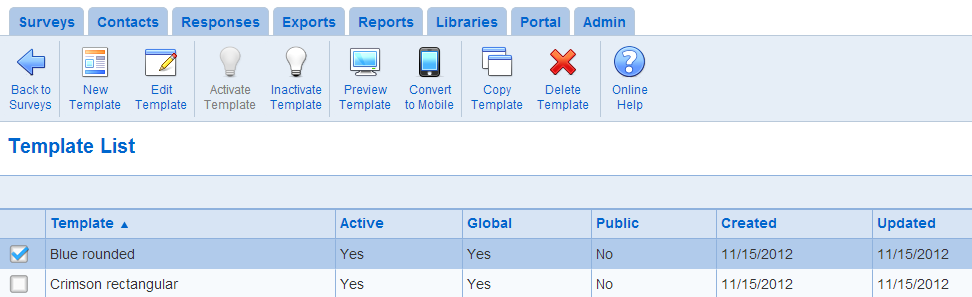
All logged in users can view the list of templates in their organization and all global templates. Creation of templates is available for user with Survey creator role. Modification of templates is restricted to the owners of the template.
- New Template: Creates a new template. See Templates
- Edit Template: Modifies the template currently selected. See Templates
- Activate Template: Activates the template currently selected
- Inactivate Template: Inactivates the template currently selected. Inactive template cannot be selected for new surveys. They remain available for surveys that used them before they were made inactivate.
- Preview Template: Show a preview of the template currently selected in a new tab in the browser.
See also Pop-ups, Javascript, Cookies and Use Novi Survey with Firefox.
- Convert to Mobile: Makes a copy of a template and optimizes the setting of the copy for mobile devices. Note that further edit may be made at will to the copy of the template using the Edit Template tool.
- Copy Template: Creates a copy of a template currently selected. Note that the name for copy is derived from the name of the original template.
Copying a template is useful when you have only read access to a template and you would like to make some modifications to the template. When you make a copy of a template you automatically have write access to the copy you created and you can therefore modify it.
- Delete Template: Deletes the template currently selected. You cannot delete a template if the template is used by surveys. The deletion of a template cannot be undone.
See also How to work with tables