|
Section list
|   |
The section list shows and provides means to manage the list of sections for the survey.
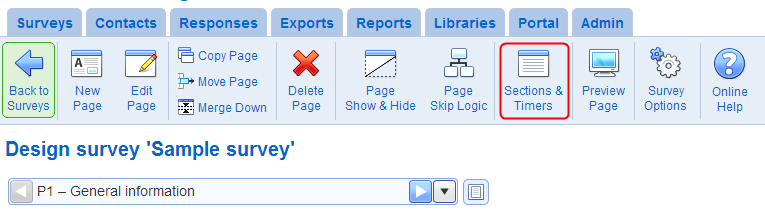
The section list is access from the survey page list using tool Sections & Timers.
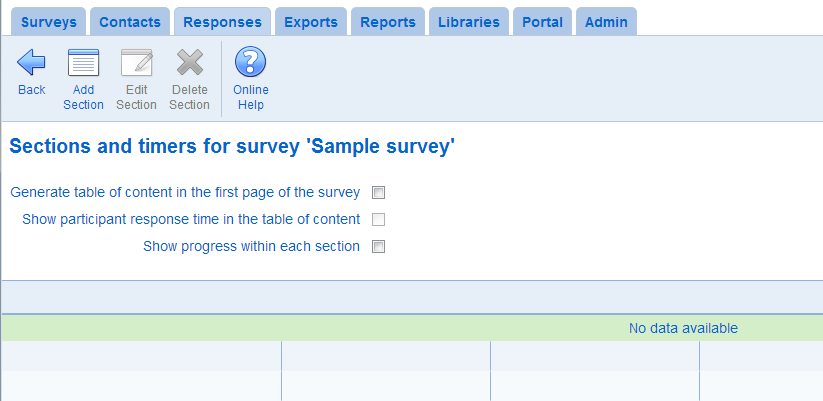
- Generate table of content in the first page of the survey
If this option is set and there are sections for the survey, the first page in the survey will contain a list of section. The table of content contains one entry of each section. The participant can navigate to the first page in a section by clicking on the entry for the section in the table of content. See also Sections table of contents.
- Show participant response time in the table of content
This option is available only when option 'Generate table of content in the first page of the survey' is set. When the option is set, the table of content will show the time used by the participants to answer the section.
- Show progress within each section
This option changes the manner in which progress is displayed to the participant (see progress options in the survey template). If the option is set, the progress shown corresponds to the progress within the section rather that within the survey. If the option is set and there are pages in the survey that are not in a section, no progress will be shown to the participant for these pages.
- Add Section: Creates a new section in the survey. See also Edit section
- Edit Section: Modifies the section currently selected. See also Edit section
- Delete Section: Deletes the section currently selected. This operation cannot be undone.
See also How to work with tables