Novi Survey Home
|
Templates - Progress
|   |
The matrices tab contains parameters that affect the appearance of the progress indicator shown to respondents when they take a survey. The progress indicators include a progress bar and the survey page number as shown in the figure below.

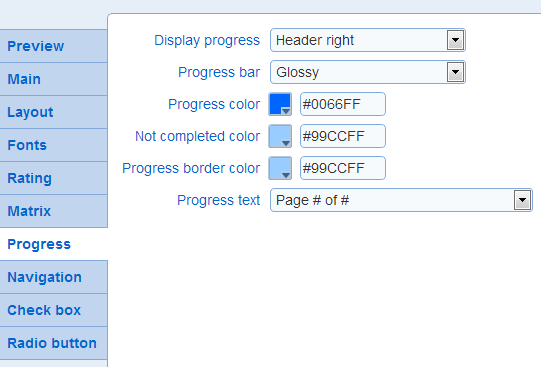
The parameters controlling the visual appearance of progress indicator are:
- Display progress: Controls where to display the progress indicators. The options are in the header or the question areas (see also Templates - Layout) or to not display any progress indicator.
- Progress bar: Controls whether the progress will be flat or glossy. The option to not display a progress bar is provided also.
Examples:
 Flat
Flat
 Glossy
- Progress color: The color of the portion of the progress bar that show the completed fraction of the survey.
- Not completed color: The color of the portion of the progress bar that shows the fraction of the survey not yet completed.
- Progress border color: The color of the border around the progress bar. If not color is set, a black border will be drawn around the progress bar.
To make it appear that there is no border around the progress bar, choose the color that correspond to the background where the progress bar is located (i.e., either the header or the question area).
- Progress text: The format for the text message to display to indicate progress.
Examples:
 Page # of #
 Page #
 Page number only
 # of #