|
Portal
|   |
The portal allows users with a login to the system to view surveys that they have responded to, surveys that they are in the process of completing and invitations to surveys. They can also run the reports to which they have access.
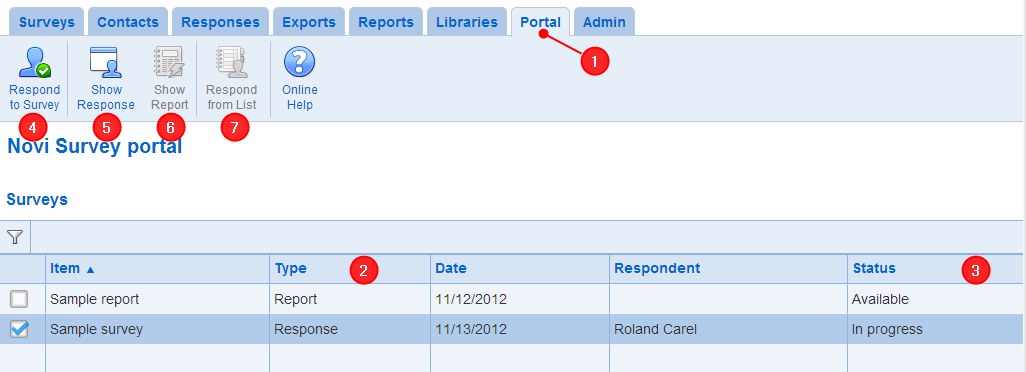
1. Accessing the portal: To access the portal, click on the Portal tab in the ribbon menu
2. Items available in the portal: The portal contains a collection of surveys, responses, invitations, and reports.
- Survey correspond to surveys that can be answered to from the portal. User who have the bulk data entry role see surveys that allow bulk data entry in the portal and can enter multiple responses for the survey.
- Responses are either partial or complete answers to surveys.
- Invitations are specific to the current user and can be used to start responding to a survey. The survey for the invitation is shown in the "Item" column.
- Reports, including assessment results can be launched directly from the portal. The reports shown are the reports published to respondents matched to the surveys answered by the user. A report published for a given survey (or list of surveys) will not be available until the user has answered the survey (or all of the surveys in the list for the report).
3. Status: Indicates the status for the item. The status of reports is always 'Available'. The status of surveys and invitations is either 'Not started' or 'Declined'. Answers for surveys can be entered if the survey status is 'Not started'. The status of responses is either 'In progress', 'Completed', or 'Abandoned'. Only response with status 'In progress' can be continued. A response is abandoned when the respondent starts answering the survey but cannot complete the response. The response cannot be completed either because the survey close date is past or the survey cannot be resumed or the number of days since the survey was started is greater than the number of days allowed to resume an answer.
4. Respond to Survey: Starts a new answer for a survey
5. Show Response: Shows the data recorded for a response
6. Show Report: Launches a report in a new tab
7. Respond from List: Enables entering responses for a survey on behalf of the actual respondents, using a contact list to specify the respondents. This function is available if the current user has the 'Bulk data entry' role and the item selected in the 'surveys' table is a survey that allows bulk data entry. This tool enables the selection of a contact list in the organization for the survey and of a person in the list. A response with the respondent set to the person selected in the contact list then can be recorded by the current user. The process can be repeated, allowing the recording of responses in situations such as telemarketing, keying data from paper surveys sent to lists of people, or a team leader recording responses on behalf of team members.