|
Invitation report
|   |
Invitation reports provide overall statistics as well as detailed information for one invitation group or all invitation groups for a survey. Invitation reports are available for surveys with at least one invitation group that has a status of "Processing" or "Completed". If all of the invitation groups for a survey have status 'Waiting for processing', then the invitation report is not available.
Invitations are released progressively over time. The larger the number of contacts in an invitation group, the longer the group processing will take. The statistics shown in the invitations reports provide detailed information on the processing advancement of the group.
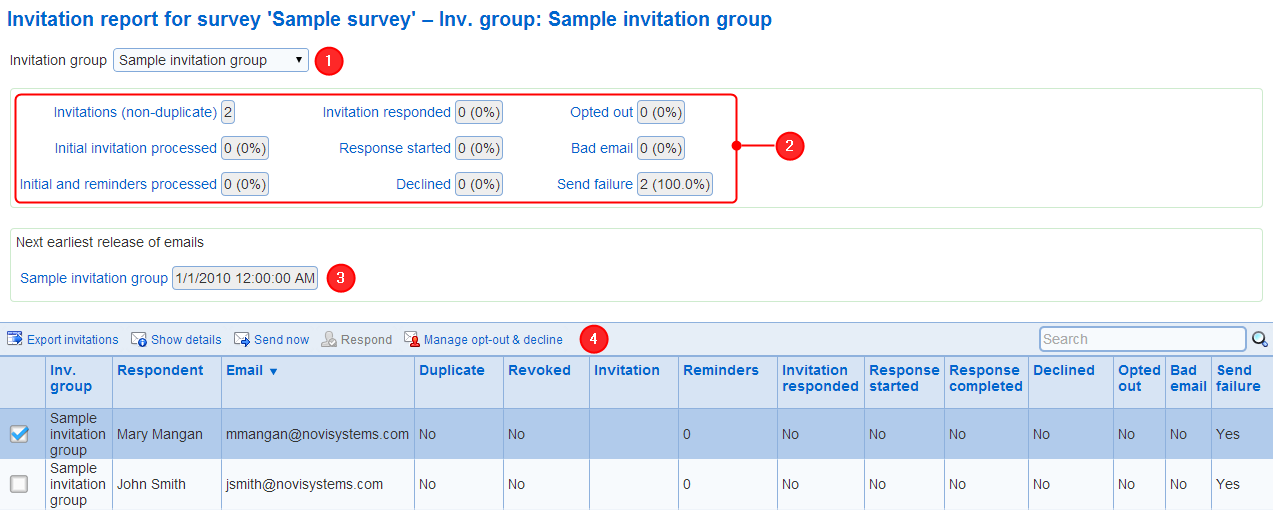
1. Invitation group
Specifies which invitation groups are shown in the report. When there is more than one group owned by the user for the survey, option "All groups" shows the invitation for all such groups.
Both the statistics and the detailed invitation table are affected by and reflect the choice of the invitation group.
2. Group statistics
The following statistics are available for the selected invitation group (or all groups):
- Invitations (non-duplicate): the number of invitations for the group. Invitations considered duplicates are not counted. All percentages shown for the other statistics are relative to the number of non-duplicate invitations.
- Initial invitation processed: invitations for which the initial email is sent.
- Initial and reminders processed: invitation for which the initial email and all reminders are sent. For groups with status "Completed", this statistics is 100%.
- Invitation responded: the person invited has responded to the invitation. The exact meaning of 'responded' depends on option 'invitation responded' for the invitation group from which the invitation originates.
- Response started: the person invited has answered at least 1 question in the survey.
- Response completed: the person invited has completed the response corresponding to the invitation. For surveys that allow more than one response per invitation, the response completed statistics refers to the most recent response started from the invitation. For example, if a respondent completes a response from an invitation and subsequently starts another response from the same invitation, then the response completed statistics will correspond to the completion of that second response. The completion of the first response will not affect the response completed statistic.
- Declined: invitations for which the respondent declined to answer the survey. Note that declining to answer a survey applies across all invitation groups for the survey. Therefore declining an invitation from one group will result in all invitations for all current and future groups for the survey for the respondent being declined.
- Opted out: respondents who opted out from all surveys.
- Bad email: respondents for which a bad email report (i.e., a non delivery report NDR) was sent back by the email system in response to the invitation email. Once an email is detected as bad, no further invitation emails will be sent to that email for any survey until 6 months have passed after the receipt of the non delivery report. After 6 months, the email address will no longer be considered bad and the system will attempt to send invitations to that email address.
- Send failure: cases of failures to send invitation emails. Send failures can be an indication of an email configuration issue. Send failures are distinct from bad emails. A email detected as bad is excluded from future releases of invitations as detailed above. A send failure is often a temporary condition and the system will try for several days to resend the invitation.
3. Earliest next release of invitations for the group
This section of the invitation report provides the next earliest date and time when emails can be released for each of the invitation groups shown in the report. For groups where no new invitations can be released, the date is listed as '-'. Groups for which no new invitations can be released include completed groups and groups that are not set up to send emails. If no new email can be sent for any of the groups included in the report, then this section is omitted from the report.
4. List of invitations
The invitation list table shows one row for each invitation to a prospective respondent. Both the initial invitation email and any reminders are represented in one row.
The following tools are provided for invitations:
- Export invitations: Generates a CSV file for the invitations in the group. The CSV file contains all the data available for the invitations in the group, including the invitation URL (i.e., web link) and any error that may have occurred when sending the invitation emails.
- Show details: Provides a detailed report for the selected invitation that includes the date and time for each email sent for the invitation. The report shows all the information available for the invitation. Any error that may have occurred when sending the email invitation email is included. For example, messages captured from the email system in the case of send failures or the of non delivery reports are provided.
receipt
- Send now: Forces the immediate sending of an invitation email for the selected invitation. The email will be formatted as either an initial invitation or as a reminder as appropriate. The email will be sent even if the system has already sent the number of reminders specified by the invitation group to the recipient.
- Respond: Starts or resumes the response to the survey for the selected invitation. This function is available only if the survey allows bulk data entry and the user has the bulk data entry role.
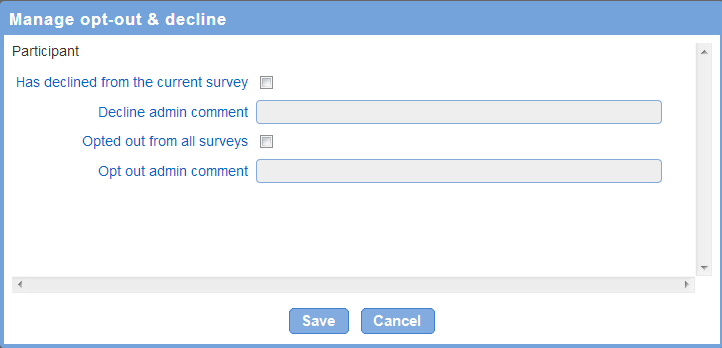
- Manage out-out & decline: Provides functions to either set or clear the opt-out or decline for the invited participant. Additionally, a comment can be entered for the opt-out and the decline. Note that the comment is entered by the user accessing the invitation report. The comments are not communicated to the respondent. Additionally, the comments are removed automatically if the opt-out or the decline is removed for the respondent. The ability to remove the opt out and decline status for respondent is provided as a means to correct unwanted opt out and declines only. Use of these functions outside and beyond this purpose may result in the termination of subscriptions to the on-demand service.