|
Web connect
|   |
Web connect synchronization allows to synchronize data across different installs of Novi Survey over the web.
[Note for network administrators: Firewalls between the install must permit bidirectional communication between the installs. The communication between the installs consists of web services calls over http or https.]
The web connect synchronization offers a feature not available in the file synchronization through selective tagging of responses. When synchronizing responses, tags can be applied to the responses. These tags will be created in the destination install and can be used to identify the source of responses. For example, consider 3 installs of Novi Survey including a central corporate install and 2 install on laptops or tablet PCs. The laptops are used to collect responses in the field. Upon reconnection to the corporate network, the synchronization feature can be used to transfer the responses from the laptops to the central install. The responses can be tagged (e.g., with the name of the laptop or some other identifier), identifying their origin. At a later time, the subset of responses in the central repository that correspond to each laptop can be transferred back into the same or another laptop. The ability to transfer tagged responses only can be used for tracking responses or enforcing security and restricting access to response data across installs.
Note that only one tag may be applied to a response. If the same response is synchronized with different tags (e.g., from different installs), only the tag last applied to the response will be tracked in the destination install.
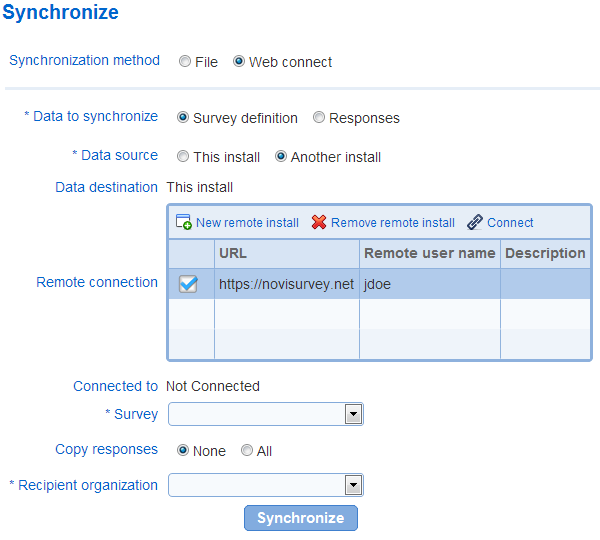
- Data to synchronize
Defines whether survey definition (i.e., pages and questions) or responses for survey should be synchronized.
When option "survey definition" is selected, the questions and other options for the survey will be synchronized in the destination install. Note that alerts and invitations for the survey, if any, are not synchronized. When this option is selected, responses for the survey can be synchronized also (see option "Copy responses" below")
When option "responses" is selected, responses for a survey will be synchronized in the destination install. Survey definition differences (e.g., extra or missing questions or differences between the text for questions) will not be synchronized.
See below for a definition of the source and destination installs.
- Data source and destination
The data source specifies the install containing the data to be synchronized. Data can be synchronized from the current install (set data source to "this install") to another install (i.e., data push) or from another install (set data source to "another install) to the current install (i.e., data pull).
The data destination is determined from the choice of the data source. It is set to "another install" if the data source is "this install" and vice versa.
When synchronizing data, the data in the source install remains unchanged. All addition, modification, and deletion of data are performed in the destination install.
Remote connection
Defines connections to remote installs. Connection settings are saved after they are defined.
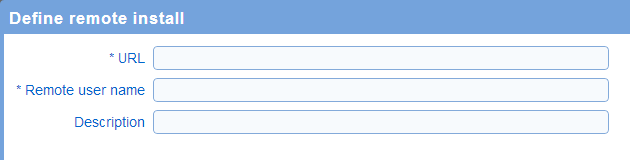
A connection is composed of the following data:
URL: the URL to the remote install of Novi Survey (e.g., https://novisurvey.net)
Remote user name: the login name for the user in the remote system to use to connect. The remote use may be but is not required to be an administrator of the remote install.
Description: an optional description of the connection used for informational purposes.
To connect to a remote install, select the row in the table corresponding to the install and press "Connect" below the table. When prompted, enter the password corresponding to the user specified for the connection.
Once connected to a remote install, a message will be shown below the table, corresponding to the connection.
- Survey: Defines the survey that should be synchronized.
- Copy responses
This option is available when "data to synchronize" is set to "survey".
Specifies if in addition to the survey definition, responses for the survey should be synchronized also.
The options available are:
None: only the survey definition will be synchronized
All: all responses will be synchronized
Tagged: only tagged responses for the selected tags will be synchronized. This option is available only when there are tagged responses for the survey. When the option is selected, the list of tags for the responses is displayed and one or more tag can be selected. Only those responses with the selected tags will be synchronized. See also the description of the purpose of tags in the introduction for this page.
- Response overwrite
This option is available when "data to synchronize" is set to "survey" and option "copy responses" is set to something other than "none".
The option specifies when responses should be overwritten in the destination install and is identical to the similar option available in the synchronization file import.

- Tag responses
This option is available when "data to synchronize" is set to "responses".
The option defines is the responses synchronized should be tagged in the destination install. See also the description of the purpose of tags in the introduction for this page.
No tag: the responses will not be tagged in the destination install
Existing tag: when there are tags defined for responses to the survey in the destination install, these tags will be displayed. If one of these tags is selected, the responses from the source install will be marked with the selected tag after synchronization in the destination install.
New tag: a new tag can be defined. The tag will be applied to the responses synchronized in the destination install.

- Recipient organization: Defines the organization in the destination install that should receive the survey and/or the responses.