|
File synchronization
|   |
File synchronization allows to save data as a file and to import the file into another install of the same version of Novi Survey.
Export
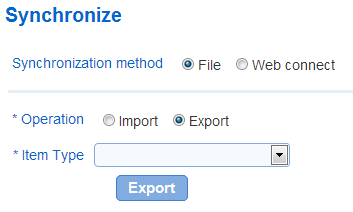
- Item Type: The type of data to export, either templates or surveys and responses.
Export Survey and Responses:
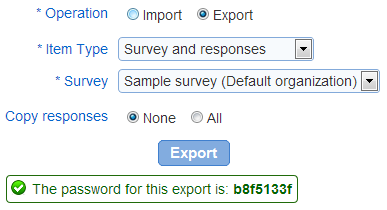
- Survey: The survey that should be exported. Surveys available for export include the surveys in the current organization for which the user has direct or implied ownership. Implied ownership arises from an organization or a system administrator role for the user. See also: privileges for surveys.
- Copy responses: Specifies in the responses should be exported along with the definition of the survey.
None: Only the survey definition is exported
All: The survey definition and the responses for the survey are exported. If the survey has a large number of responses, the export can be large and exceed the maximum size allowed by the web application configuration. In such case, the export will not complete and the error page will be displayed.
The export file when exporting surveys and responses is a password protected archive (ZIP). The password for the archive is displayed in the screen at the time of the export. The password is required to import the archive in another install of the system.
Import
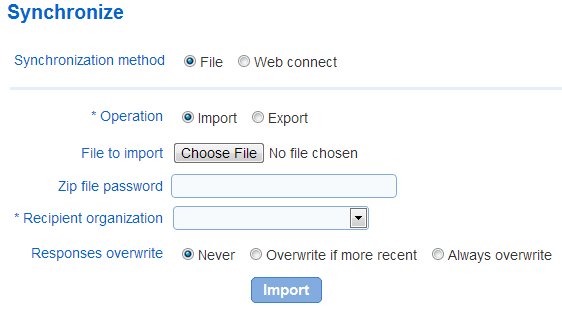
- File to import: the file containing the data exported from another install of Novi Survey.
- Zip file password: the password for the file as provided at the end of the export operation. The password for the file containing the exported data must be known to perform the import.
- Recipient organization: the organization that should receive the data imported
- Response overwrite: Specifies how responses are imported when the data imported and the install receiving the data contain corresponding (i.e., the same) responses. The options are:
Never: responses in the install will not be modified
Overwrite if more recent: the responses in the install will be overwritten only if the corresponding responses in the imported data were modified more recently
Always overwrite: the imported responses will always overwrite (i.e., replace) the corresponding responses in the install.