|
Search and replace within a survey
|   |
To perform a global search and replace operation within a survey, select the Replace Text tool in the ribbon menu.

To perform a search enter the piece of text to search (1) and press the search button (2).

1. Search for
The text to search for. The text specified will be search within:
the fields for the survey
- all survey pages fields
- all question fields
- all presentation elements fields
- all page group (i.e., sections) fields
- all score fields
The result of the search is a table of matches that shows all occurrences of the text searched. The context of the match is shown using the shorthand notation.
The 'replace' column allows to specify which matches should be replaced.
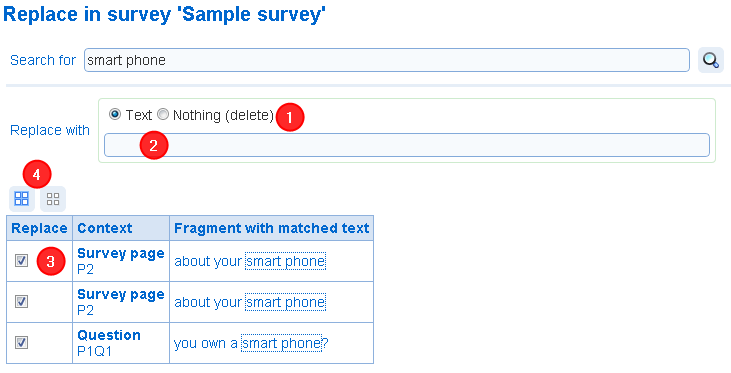
- Replace with (type): The type of replacement to perform. The found text can be replace by some user specified text or deleted from the survey.
- Replace with (value): Defines the replacement text. This field is available if the replace with (type) option is set to 'Text'
- Found occurrences of the text to search: Each occurrence of the text to search is listed with the context. The check box specifies if an occurrence of the text to search should (if the check box is checked) or should not (if the check box is not checked) be replaced.
- Select all/Unselect all: Allows to select or unselect all occurrences of the text to search.
When the Save Changes tool is pressed in the ribbon menu, all matches marked for replacement will be replaced with the text specified. This operation cannot be undone. To exit without replacing any text, use the Cancel Changes tool.