|
Viewing and managing lists of contacts
|   |
Contacts are organized in lists. Each list contains any number of contacts and a contact (i.e., a person) can belong to many lists.
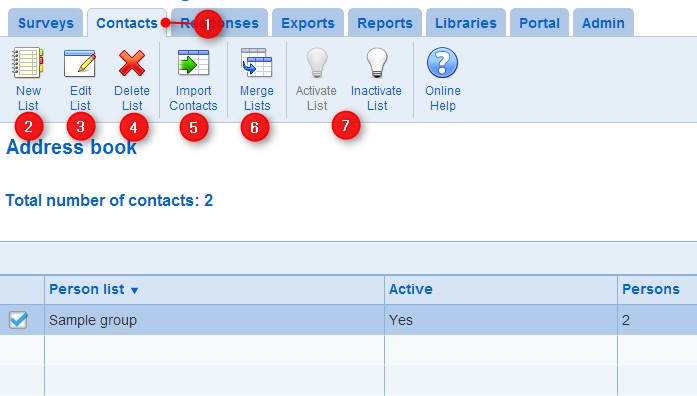
- Contacts are managed from the Contacts tab
- To create a new list of contacts, use the New List tool.
Creation of a new list of contacts requires the Survey creator role.
- To edit a list of contacts, select the list and use the Edit List tool.
To edit a list of contacts, you need to be an owner of the list.
- To delete a list of contacts, select the list and use the Delete List tool.
To delete a list of contacts, you need to be an owner of the list.
- To import a list of person from a file, use the Import Contacts tool.
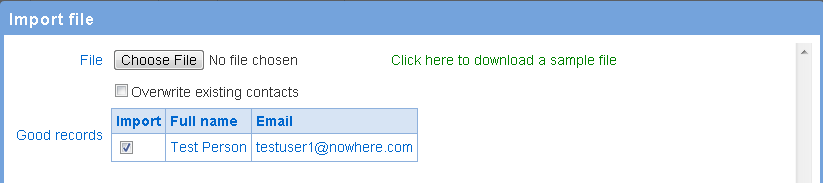
Browse to and select the file with the data to import. The file should be in comma separated format (csv) and conform to the format specified by the sample file (see also File format for persons and users). The sample file is available from the link to the right of the Browse button. Mandatory data in a column is indicated in by the presence of an asterisk (*) in the column header (e.g., Email*). Rows in the file that are missing a mandatory value will not be imported.
Two tables of records are created from the data in the file. The Good records table contains the records that can be imported in the person list. The Bad records row contains invalid records that cannot be imported. Records may be invalid because they are missing mandatory values or because the email address in the record does not have a valid format.
The Good records table comprises an Import column. The check boxes in the Import column can be used to avoid importing specific persons.
After reviewing the Good records table, press the Import button to finish the import of the users in the person list. Note that the new persons in the person list are not saved permanently until the Save button is pressed at the bottom of the screen.
Import and update of preexisting persons
Note that the import can create new persons in the system and can also be used to update persons already recorded in Novi Survey. Persons in Novi Survey are identified through their combined first name, last name, and email. Two persons are considered to be the same if they have identical first name, last name and email. When a file contains a person with the same first name, last name and email as a person already in Novi Survey, the update behavior of the preexisting person depends on option 'Overwrite existing contacts'.
If the option is not set, only fields populated in the file and not populated in the preexisting person will be updated. For example, if 'Phone1' is set in the file and not set in the preexisting person, the person will be updated with the value of 'Phone1' from the file. Conversely, if 'Phone1' is set in the preexisting person, the value of 'Phone1' in the file will be ignored and the 'Phone1' field for the person will remain unchanged.
If the option is set, the value from the file will always over write the value for the preexisting person. In the example above, the over write would result in the value for 'Phone1' in the file to replace the value of 'Phone1' for the preexisting person. This over write behavior applies even if the value for a field in the file is undefined, in which case the corresponding field for the preexisting person will be erased.
Note that in the import screen, the 'Good records' section always reflect the data from the file, regardless of the value for option 'Overwrite existing contacts'.
- To merge the list of contacts with another list, use the Combine Lists tool.
Select the list to which the current list should be combined with and select the type of combination.
The combination of options available are illustrated below. The current list is represented by the left circle. The list combined with the current list is represented by the right circle. The result of the combination operation is the represented by the shaded area.
- Union

- Intersection

- Minus

To perform the combination, press OK. Note only the current list is modified through the combination operations. The list that is combined with the current list is not changed.

- To inactive an inactive list or activate an inactive list, use the Activate List or Inactivate List tool
For each list of contacts, the number of persons in the list is shown in the table. The total number of contacts for all lists is also provide above the table. List containing a specific person can be identified by using the search function. When the list are subject to search criteria, the total number of contact and the number of contact in each list will reflect the search criteria and be lower than the numbers shown when no search criteria is in effect.